

.png)
.webp)


.webp)


.webp)


In this article
How to Enable Real-Time Payment Status in NetSuite
📌 Customers often seek clarity on whether their payments have gone through or remain pending. Without real-time visibility, AR teams face repeated follow-ups and support requests. By enabling real-time payment status in Oracle NetSuite’s Customer Portal, you can reduce friction, increase transparency, and improve customer satisfaction.
Steps to Enable Real-Time Payment Status
Step 1: Enable Online Payments in NetSuite

- Go to Setup > Company > Enable Features
- Under the Transactions subtab, check the Credit Card Payments option
- Under the Web Presence subtab, enable Customer Access
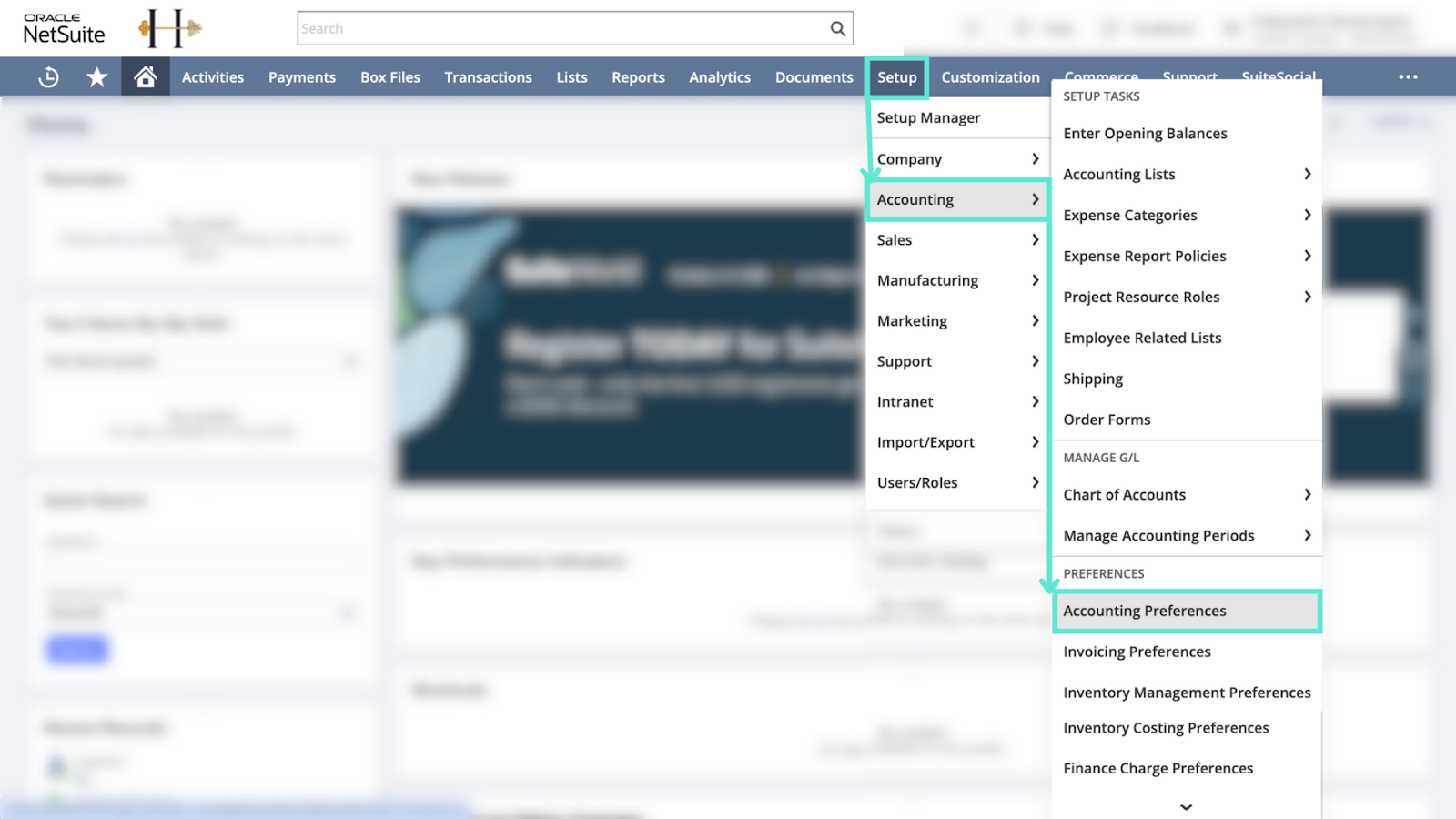
- Navigate to Setup > Accounting > Preferences > Accounting Preferences
- Under the Items/Transactions subtab, enable Customers Can Pay Online
- Configure payment methods and processing profiles as needed for your gateway integration
Step 2: Set Up and Customize the Customer Center
- Use NetSuite’s standard Customer Center Role to define access
- Customize the role to control what customers can view, such as invoices, orders, and payment statuses
- Ensure that customers have permissions to access the Transaction History and Payment Status
- Decide whether to allow payment initiation directly from the portal
Step 3: Integrate With a Payment Gateway (Optional but Recommended)
- Choose a supported gateway like Stripe, PayPal, or Authorize. Net
- Integration ensures real-time payment processing and automatic status updates in NetSuite
- Payments marked as Paid, Pending, or Failed appear immediately in the customer portal
Step 4: Enable Key Customer Portal Features
- View Transactions: Customers can access their invoices, orders, and account activity
- View Payment History: A running list of past payments, including dates and methods, is available
- Real-Time Status: The current status of each payment (e.g., “Paid” or “Pending”) is displayed clearly
- Initiate Payments: If configured, customers can pay invoices directly from the portal
- Customer Communication: Notes, reminders, and follow-ups can be shared through the portal interface
Pro tip: Growfin complements NetSuite collections management by offering real-time visibility, automated payment tracking, and smart reminders, giving customers and finance teams a shared, always-updated view of what’s paid and what’s due. To learn more check out the Bridging the Receivables Efficiency Gap: Going beyond NetSuite webinar!


.webp)
.webp)

.webp)
.webp)